
WebMCP explained // from finding answers to completing tasks
A customer asks an AI assistant to compare your services, check availability and help them take the next step. Your website might explain the offer beautifully. Can the assistant actually use it?
WebMCP, short for Web Model Context Protocol, is a proposed browser interface that lets a website offer structured tools to AI agents. Instead of making an agent infer every action from buttons and screenshots, the site describes available functions, their inputs and their results. For a website owner, the opportunity is a clearer route from a visitor’s intention to a useful action. Chrome’s WebMCP overview explains the mechanism.
Getting cited helps someone find your business. Completing the right task helps them choose it.
What should website owners know about WebMCP now?
WebMCP deserves a small, purposeful experiment rather than an urgent website rebuild. The opportunity is tangible, but browser support, reliable execution and commercial demand need separate evidence.
- The interface is still evolving. The 10 November specification is a Community Group draft, not a W3C Standard. Check the actual client and browser you intend to support.
- AI referrals already matter commercially. Adobe measured US retail AI-referred traffic up 393% year on year in Q1 2026. That measures visits from AI sources, not purchases made autonomously through WebMCP. See Adobe’s retail findings.
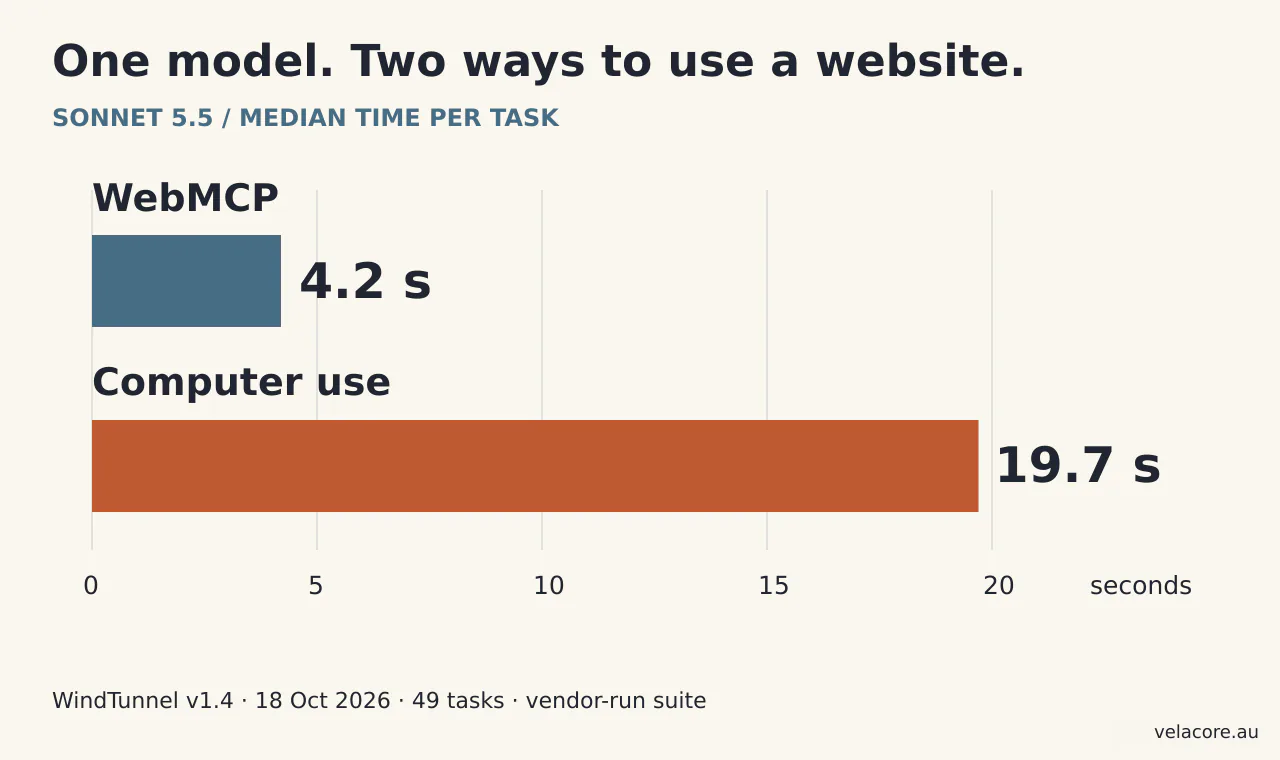
- Explicit tools can shorten an agent’s work. In one same-model comparison in the WindTunnel v1.4 benchmark, median task time was 4.2 seconds with WebMCP versus 19.7 seconds using screenshots. The test setting matters; the figures are not a forecast for your site.
What is WebMCP, and how does an agent use a website?
WebMCP gives a compatible agent a described function it can call while interacting with a page. Think of a public product finder: the website can explain that find_products accepts a category and a budget, then returns matching products with current URLs.
Without that interface, an agent may read the page structure or screenshots, identify a filter, enter a price and inspect the results. A structured tool makes the intended operation explicit. The business still supplies the search logic, prices and availability.
A browser agent is an assistant that can take actions using available tools, rather than only produce a written answer. Its job might be gathering a shortlist, checking an order or preparing an enquiry. The user’s instruction, the available capabilities and the website’s permissions determine how far it can go.
Chrome documents JavaScript tool registration and a separate declarative approach using form annotations. Those are implementation paths to investigate, not a reason to hide ordinary navigation or replace accessible forms. See the declarative form API.
A clearer interface is useful. A larger collection of poorly described tools is just another confusing menu.
WebMCP vs MCP: which part of the system changes?
WebMCP exposes capabilities from a web page’s browser context. Server-side MCP exposes capabilities through an MCP server connected to a client. The distinction is where the tools live and how the client reaches them, not whether the underlying business operation needs permission.
| Interface | What it supplies | Practical example |
|---|---|---|
| Search and readable content | Information a system can retrieve, assess and cite | An assistant links to a clearly explained service page. |
| WebMCP | Structured capabilities offered by a page | A compatible browser agent filters a catalogue using a named tool. |
| Server-side MCP | Tools and resources exposed through an MCP server | An authorised assistant queries a connected business system. |
The WebMCP project explainer describes the relationship to MCP. A public brochure site, a transactional store and a staff-only portal may justify different approaches. Start with the job, then choose the interface.
WebMCP also does not replace your CMS. Your publishing system still maintains service information, products and policies. The tool layer should use the same approved facts that people see, which is why AI and CMS architecture belong in the same conversation.
Does the data justify preparing for AI agents?
The evidence justifies preparation, particularly for businesses with searchable catalogues or repeatable customer tasks. It does not justify treating every automated request as a future sale.
Cloudflare reported 1,700% growth in daily AI-agent requests over the year covered by its September 2026 analysis. That is activity across Cloudflare’s network, not a count of unique shoppers or completed transactions. Read Cloudflare’s network analysis.
Adobe’s Q2 report adds a commercial signal: in March 2026, AI-referred visitors to US retailers converted 42% more often than non-AI traffic. Its retail analysis draws on more than one trillion visits and over 100 million SKUs. Visitor selection and shopping intent can affect the comparison; it is not evidence that an AI interface caused the increase.
The separate engineering question is whether structured access makes a task easier. WindTunnel provides a useful comparison to inspect:
| Method | Median task time | Median task cost | Successful attempts |
|---|---|---|---|
| WebMCP | 4.2 seconds | US$0.003530 | 147 of 147 |
| Computer use | 19.7 seconds | US$0.031641 | 140 of 147 |
The suite uses 49 tasks across eight applications, with three attempts per task. Nekuda, a vendor working in this space, operates it. The configurations also differ in their frameworks and turn budgets. These same-model rows suggest a worthwhile efficiency experiment; they do not establish a universal success rate. The benchmark code and methodology make the claim inspectable.
Your own test should measure completion, errors, elapsed time and whether the result was correct. A fast answer pointing to an unavailable product is still a failed task.
Why does ChatGPT cite one source instead of another?
A useful source gives an assistant specific evidence for the question it is answering. You can inspect that evidence, even though the citation alone does not reveal the model’s internal selection process.
OpenAI’s ChatGPT Search documentation contains a real example linking a strawberry-growing answer to University of Maryland Extension. The screenshot below preserves that citation card rather than recreating an AI response.

Open the underlying university guide. It gives the topic a precise title, compares named cultivars in a table and identifies an author and reviewers with relevant horticultural roles. A reader can verify the recommendation against the source.
That makes it a plausible source match: subject-specific evidence, extractable detail and accountable expertise. It does not show that every university page is preferred, or that the same answer will always cite it. Apply the pattern to your business: publish the actual criteria, explain the exceptions and make the person responsible for the information identifiable.
Can an agent-friendly website pass three separate tests?
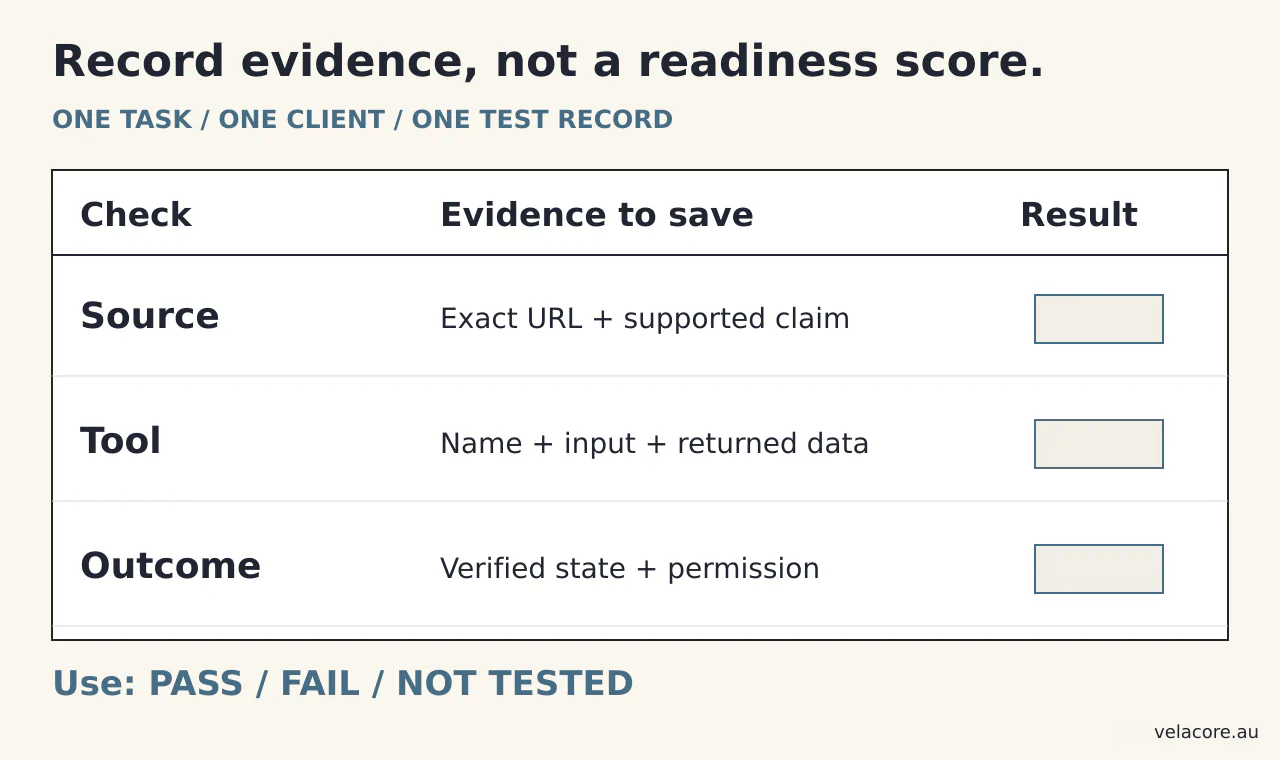
An agent-friendly website needs evidence at three levels: the assistant can find accurate information, a compatible client can discover and call the intended tool, and the business operation completes within its permissions.
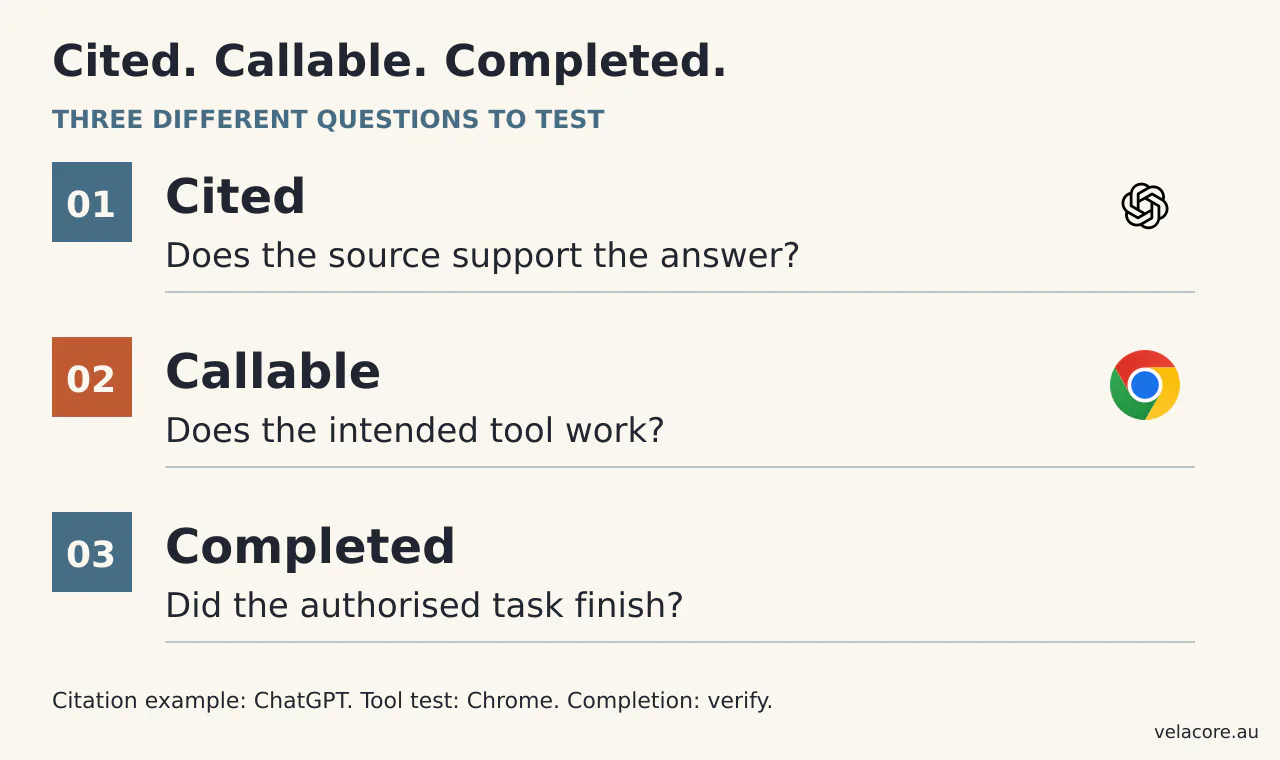
- Source test: can the assistant retrieve and accurately cite the information a customer needs?
- Tool test: can the chosen client find the correct capability, supply valid inputs and understand the result?
- Outcome test: does the result match the real system state, with consent and permissions intact?
A service page can pass the first test while offering no callable action. A tool can pass the second while returning stale availability. Treat these as separate acceptance checks, not a single “AI-ready” badge.
For broader preparation, the AI agent-ready website guide covers readable content, trust and task boundaries. The next step here is narrower: prove one useful operation.
A citation is not itself a visit. If search visibility remains strong while visits fall, the AI Overview traffic-loss guide helps you investigate what changed.
What does a practical WebMCP demonstration look like?
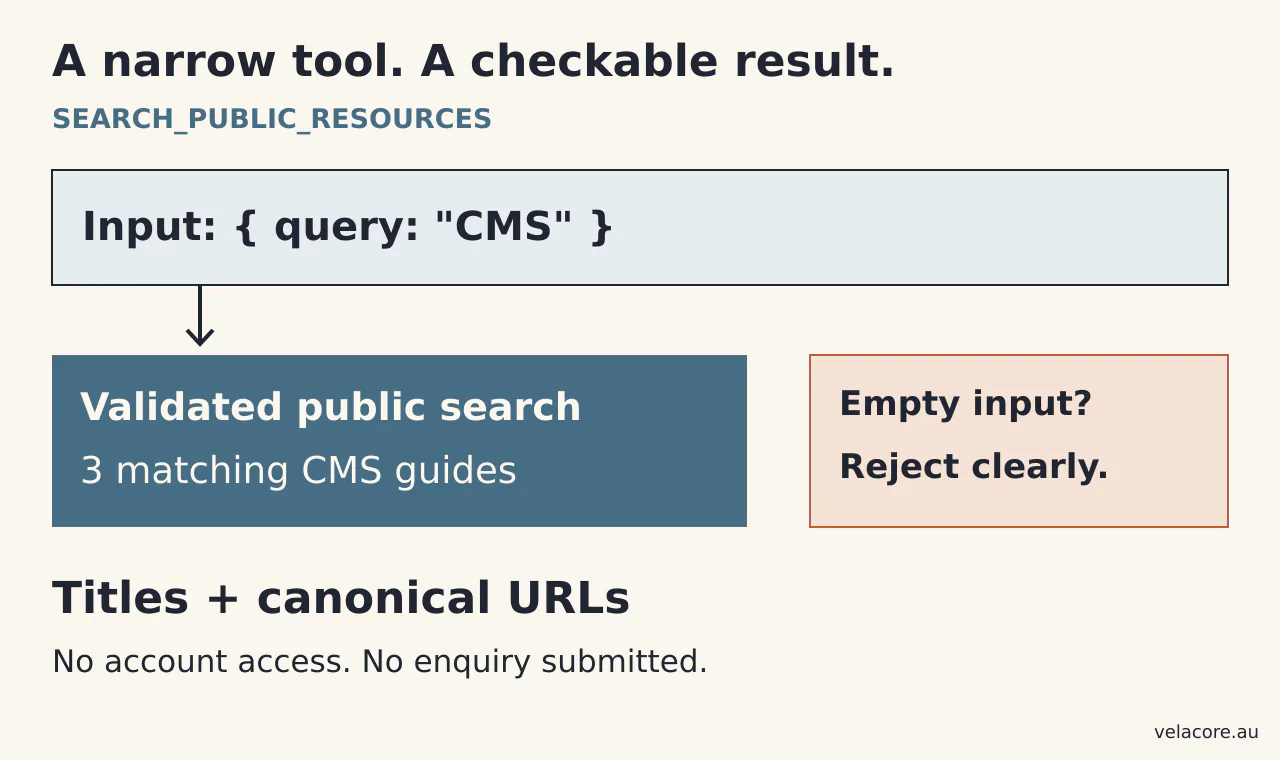
A good first WebMCP tool searches public information and returns a small, checkable result. The demonstration built for this article searches three public CMS resources; it cannot send an enquiry, access an account or create a booking.
The visible form and the tool share the same search function. A query for CMS returns three article titles and their URLs. Empty input is rejected. A query with no match returns an empty result list rather than inventing a recommendation.
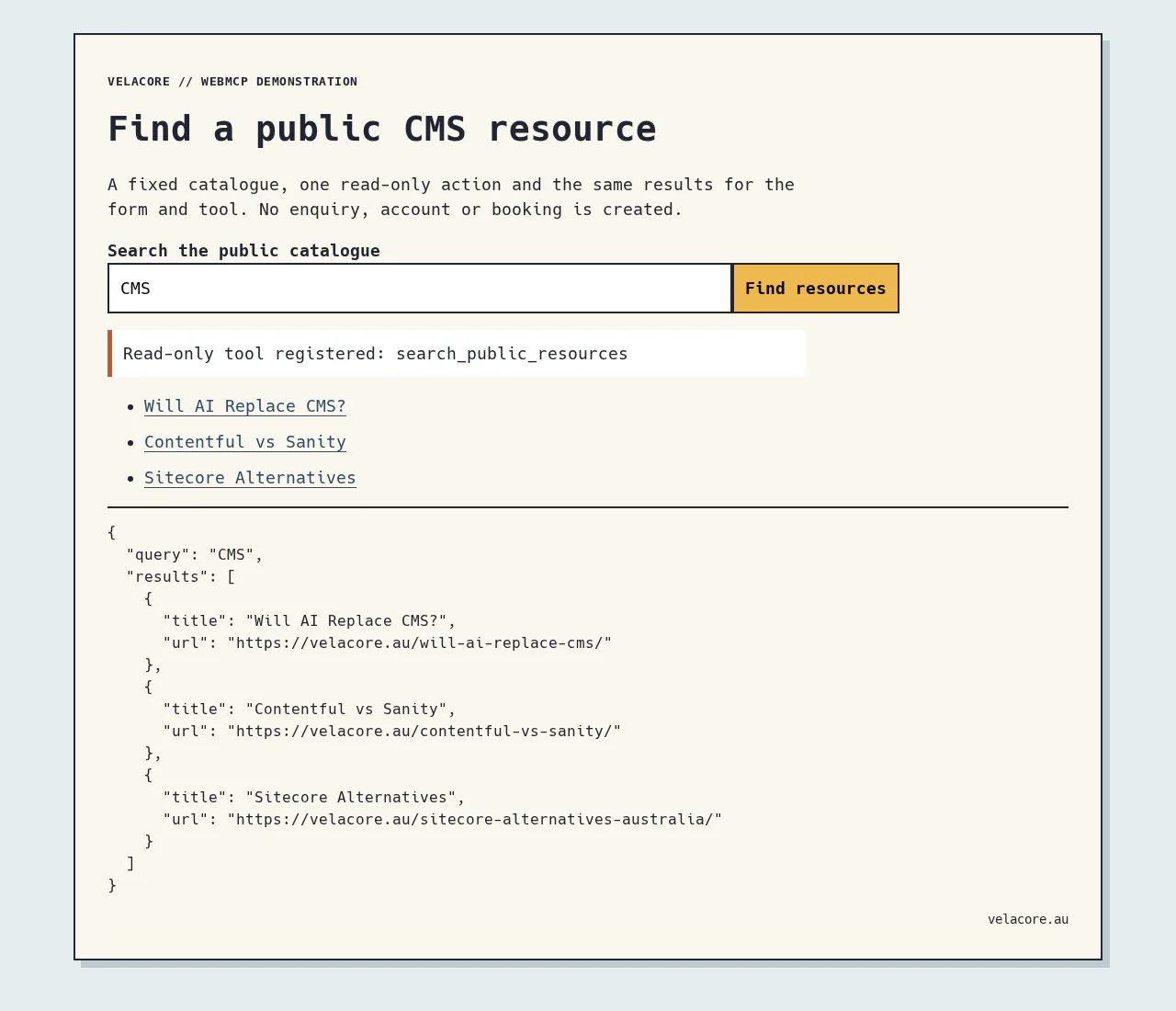
The local test used Chrome 149’s experimental navigator.modelContext interface. The current draft and Chrome documentation use document.modelContext. The demonstration includes an explicitly labelled adapter for that older test browser; new implementations should follow the current imperative API documentation.
This is a browser-level tool test, separate from the ChatGPT citation example. It establishes that the registered function can be called and produces the expected visible result. Testing a chosen assistant against it is a further step.
For developers, the current registration pattern looks like this. Connect both the ordinary form and this callback to the same validated public search implementation:
if (document.modelContext?.registerTool) {
  await document.modelContext.registerTool({
    name: "search_public_resources",
    description: "Find public CMS guides. Returns titles and URLs.",
    inputSchema: {
      type: "object",
      properties: {
        query: { type: "string", minLength: 1, maxLength: 80 }
      },
      required: ["query"],
      additionalProperties: false
    },
    annotations: { readOnlyHint: true },
    execute: async (input) => searchPublicResources(input)
  });
}
Validate inputs in the function as well as describing them in the schema. Return concise data with canonical URLs. Keep the normal search interface working when the browser has no WebMCP support.
How do you run an AI website audit without guesswork?
Run an AI website audit against a named task and a written expected result. A vague request to “check whether this site is AI-ready” produces opinions that are difficult to reproduce.
Start with a task such as finding a compatible accessory, comparing two support plans or locating an accurate service specification. Avoid payment, cancellation and personal records in the first pilot.
Copy this framework into your audit brief or assistant session. Replace the bracketed fields, and keep the stop conditions:
Task: [one customer job]
Website: [canonical public URL]
Client and browser: [name and version]
Expected result: [specific facts, URLs or system state]
Allowed actions: read public pages and use named read-only tools.
Stop before: login, personal data, enquiry submission, booking or payment.

1. Find the page that answers the customer's question.
2. Quote the supported answer briefly and give the exact source URL.
3. Separate observed facts from inferences and unknowns.
4. If your client supports WebMCP, identify the relevant available tool.
   Otherwise record tool discovery as not tested.
5. With permission, test valid input, missing input and a no-match input.
6. Compare returned facts with the visible page and expected result.
7. Record errors, elapsed time, unsupported steps and any state change.
8. Report pass/fail/not tested for source, tool and outcome separately.
Do not invent tool availability, citations, successful actions or consent.
Save evidence in a simple worksheet rather than assigning an arbitrary readiness percentage. This keeps an unsupported browser from being mistaken for a broken website.
| Check | Passing evidence | If it fails |
|---|---|---|
| Find and verify | Reachable canonical page; the answer matches its source | Fix retrieval barriers, missing facts or ambiguous wording. |
| Discover and call | Correct named tool; valid inputs; understandable output | Review client support, descriptions, schemas and error handling. |
| Reject and recover | Missing and invalid inputs fail clearly; retry does not duplicate work | Repair validation and recovery before expanding the pilot. |
| Confirm and complete | Permission, explicit confirmation where needed and verified final state | Stop consequential execution until the boundary is reliable. |
Where should human approval and security stay?
Human approval belongs at a consequential decision, while the server remains responsible for enforcing access and business rules. Describing a tool as read-only or consequential is not an authorisation system.
Chrome’s tool security guidance covers annotation hints, origin exposure and prompt injection. A read-only operation can still disclose private information. A customer’s review or a third-party description can contain hostile instructions.

Separate preparation from commitment. A travel site can return suitable departures before asking someone to confirm a purchase. A service business can prepare enquiry details before the visitor reviews and submits them. The final price, identity, permissions and availability should be checked at execution, not accepted from an assistant’s earlier summary.
Keep the exposed capability narrow. A tool that accepts an arbitrary destination URL or executes arbitrary code is much harder to reason about than a tool that accepts a known product ID and returns approved public details.
Before enabling a write action
Check who may act, what they are committing to, how duplicates are prevented, what confirms success and how failure is recovered. A friendly confirmation message is not proof that the underlying operation completed.
What should you improve first on your own website?
Improve the customer task before expanding the technology. Choose a frequently needed operation, make its information and ordinary interface reliable, then test a narrow WebMCP capability in a controlled environment.
- Give important services and products stable URLs and precise, current information.
- Use labelled forms, meaningful controls and clear success or error states.
- Keep returned data consistent with the visible offer, policies and availability.
- Measure successful completion and qualified outcomes, not just tool calls.
- Retest when the browser, assistant, tool contract or underlying service changes.
For source visibility, use the AI visibility audit guide. For visits you can observe, keep AI referral measurement separate from tool execution logs. Neither dataset should be presented as a complete record of every AI interaction.
The goal is not a website with the most tools. It is a website that helps the right task finish correctly. WebMCP offers a practical way to pursue that goal, provided the content, interface and execution all tell the same story.
A useful pilot can sit within website and platform engineering or AI automation work. Start with evidence for one operation, then expand where the result earns it.
Frequently asked questions about WebMCP
Is WebMCP a finished web standard?
No. As checked on 10 November 2026, WebMCP is a Community Group draft. Browser and client implementations are evolving. Use the implementation status record, feature detection and a test in your target environment before depending on it.
Will WebMCP make my business rank in ChatGPT or Google?
WebMCP exposes actions; it does not promise search inclusion, rankings or citations. Search discovery still requires retrievable, useful information. Test whether a system cites your source separately from whether a compatible agent can use your tool.
Does WebMCP work with WordPress and headless CMS platforms?
A developer can investigate adding the browser interface to either type of website. The important dependencies are the delivered page, supported browser, client and underlying operation. Keep publishing and business data in their proper systems rather than duplicating them in tool descriptions.
Do I need to run an AI model on my website?
The website supplies tool descriptions and executable functions. A compatible agent supplies the model-driven interaction. WebMCP does not itself require the website owner to host an LLM, although a particular assistant, extension or business integration may have its own account and service requirements.
What is the safest first WebMCP experiment?
Start with a bounded public-information lookup: search a catalogue, locate a service specification or return public opening hours. Test valid, invalid and empty results. Introduce personal information or consequential actions only after the identity, approval and recovery controls are understood.
Should I wait until every browser supports WebMCP?
Fix content, accessibility, validation and task clarity now. Pilot the API only where a supported client and a real user need justify it. Keep the ordinary website usable so customers are never required to use an agent.
Sources and further reading
The research combines platform documentation, observational traffic data, a vendor-run benchmark and a local read-only demonstration. The sources answer different questions; none is presented as a guarantee of adoption or results.
| Source | Used for |
|---|---|
| Chrome for Developers | Overview and experimental implementation |
| Community Group specification | Current draft, API and status |
| Chrome imperative API | Current JavaScript registration pattern |
| Chrome tool security | Annotations, origin exposure and risks |
| Adobe Q2 2026 report | US retail referrals and conversion |
| Cloudflare agentic-web analysis | Network request growth |
| WindTunnel v1.4 results | Same-model task comparison |
| OpenAI Search help | Authentic cited-source interface example |
| University of Maryland Extension | Inspection of the source shown in that example |