
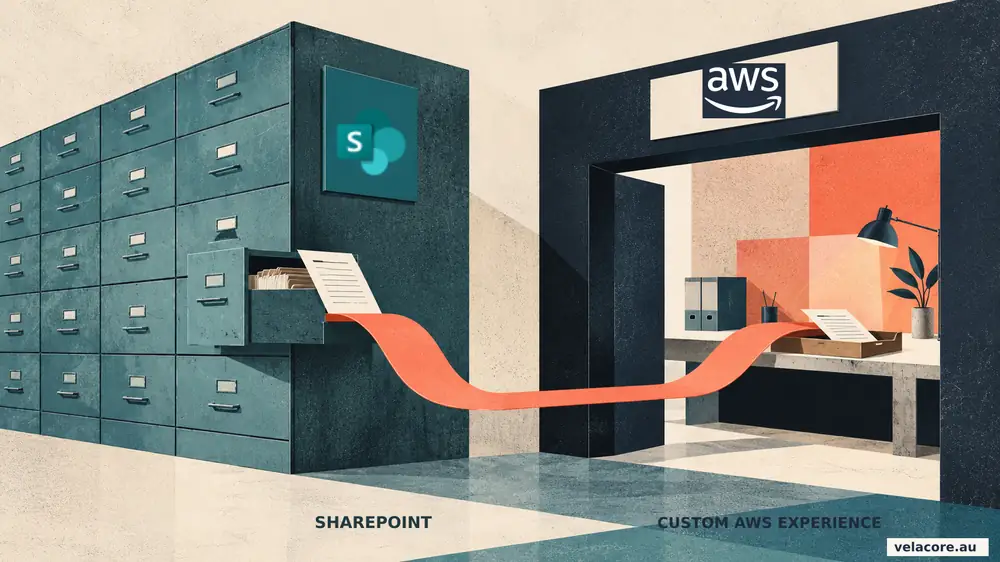
SharePoint alternatives make sense when the cost of working around the platform exceeds the cost of changing it. Here is how to tell.
Your team already pays for Microsoft 365. The documents are in SharePoint, the conversations are in Teams, and nobody wants another migration. Yet a routine approval still needs three spreadsheets, a message to the right person and a reminder next Tuesday.
The best SharePoint alternatives depend on what is failing: information organisation, the employee experience or the business workflow. Fix the first inside SharePoint, consider a supported extension for the second, and evaluate a purpose-built application for the third. A custom AWS build can keep SharePoint as its document repository while replacing the process that sits around it.
That is a more useful decision than asking whether SharePoint is universally good or bad. The expensive part of “good enough” is usually the work nobody has measured.
What does the evidence say about SharePoint alternatives?
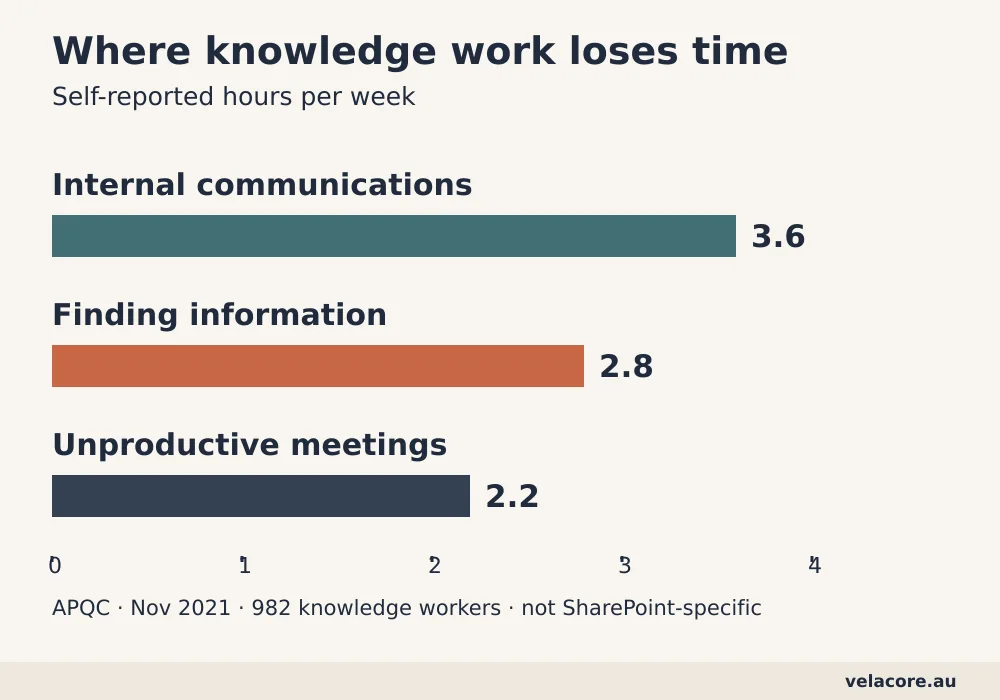
- Finding information has a measurable cost. In a November 2021 survey of 982 full-time knowledge workers, APQC found respondents estimated 2.8 hours a week looking for or requesting information. That is a cross-platform, self-reported finding, not a SharePoint performance benchmark.
- Capacity and usability limits are different. Microsoft supports 30 million list items, while the 5,000-item view threshold constrains certain operations. “SharePoint stops at 5,000 records” is the wrong diagnosis.
- Copilot follows existing access. Microsoft’s data protection architecture explains that Copilot can only reference content the user is authorised to access. Poorly governed permissions can make sensitive information easier to discover.
- Customisation still has a supported route. SharePoint Online Add-ins retired on 2 April 2026, but Microsoft explicitly excludes SPFx from that retirement. Replacing an obsolete customisation is not automatically a reason to replace SharePoint.
Why does “we already pay for it” hide the real cost?
Bundled licensing answers a purchasing question. It does not answer an operating question: how much effort does this particular process require?
Consider a contract renewal. The document lives in one library, the renewal date in a list, the supplier record in another system and the approval in someone’s inbox. Each component might work. The employee still has to assemble the process.
APQC’s research also recorded 3.6 hours a week managing internal communications and 2.2 hours in unnecessary or unproductive meetings. Those categories should not all be blamed on software, or added up as recoverable savings. They do identify sensible places to observe friction before commissioning another platform.
The distinction matters. A better search page may reduce time spent finding the contract. It will not decide who can renew it, prevent a duplicate approval or recover a failed update to the finance system.
Start with the work that crosses those boundaries. Ask the people performing it to demonstrate the task, including the emails and spreadsheets they use to get it finished. That is where the business case starts.
Which SharePoint limitations are fixable without leaving?
Navigation, inconsistent ownership and poor content organisation usually deserve a repair assessment before a replacement assessment. Microsoft’s information architecture guidance treats navigation, metadata, search and security as deliberate design decisions, not automatic benefits of uploading files.
A familiar failure is importing a network drive exactly as it stood. Twenty years of folders arrive, including duplicate policies, abandoned project names and files called “final-final-approved”. The migration succeeds technically. Finding the current policy remains a guessing game.
Folders are not inherently wrong. The missing pieces are often a clear content owner, useful naming, a current-version policy and metadata that matches how colleagues look for information.
Teams creates a structure. Your organisation still needs a map.
A Teams-connected environment can contain more SharePoint sites than users expect. Microsoft documents a parent site for the team: standard channels use folders in its library, while private and shared channels have separate sites. Treating every channel as the same storage and permission arrangement is an administration mistake.
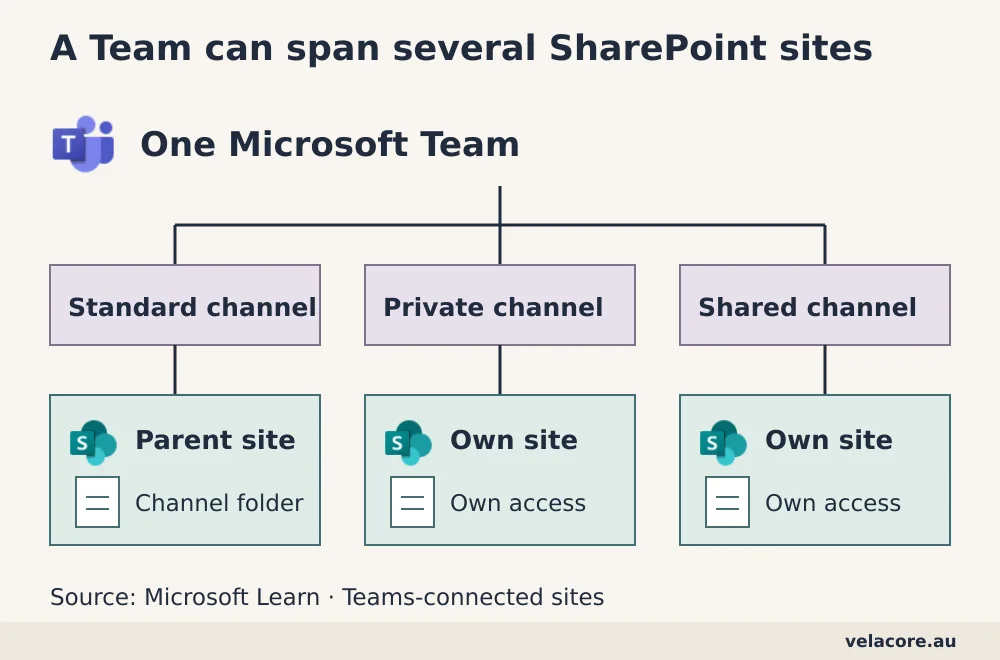
A sensible cleanup establishes which sites are active, who owns them, how people reach them and when they should be archived. Hub navigation and a useful home site can connect the experience without pretending all documents belong in one enormous library.
Try three real tasks: find the current travel policy, locate a supplier contract, and identify who owns an overdue approval. If the first two fail because the content has no reliable home, a new frontend will inherit the mess.
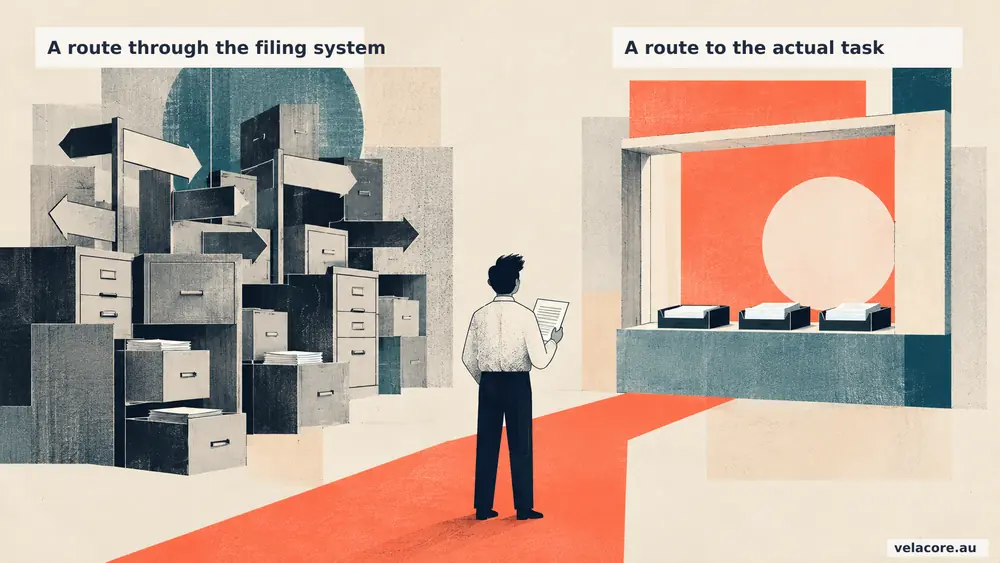
When does a document platform become the wrong business application?
SharePoint becomes a questionable application foundation when core business rules depend on a growing web of lists, exceptional permissions and automation handoffs. The issue is not whether a clever developer can make the process work. It is whether the organisation can explain, maintain and recover it.
Picture a supplier-onboarding process with legal approval, bank-detail verification and a finance-system update. It needs explicit answers to several questions:
- Who can change bank details, and who must independently approve that change?
- What prevents an expired approval or a duplicate submission?
- What happens if the finance update fails after approval succeeds?
- Where is the complete history, including retries and rejected actions?
These are application requirements. A prettier list form does not settle them.
| Constraint | What it actually means | What to investigate |
|---|---|---|
| 30 million items | Supported list capacity, not a promise that every query is efficient | Query design, indexing and the actual workload |
| 5,000-item view threshold | Certain operations can be blocked when they process too many items | Indexed filters and view design before a migration |
| 5,000 recommended unique permissions | Microsoft’s general recommendation; 50,000 is the supported limit per list or library | Whether item-by-item access exceptions are becoming the application model |
The permission-scope guidance is especially revealing. If every new business case needs another broken inheritance rule, the permission structure may be carrying work that belongs in a dedicated application. That is an architectural signal, not simply a larger-number problem.
Measure the complexity of the exceptions, not just the number of documents. You can have a manageable large library and a fragile small workflow.
Does Copilot expose a permissions problem or create one?
Copilot can make an existing oversharing problem more visible. It does not need to bypass access controls for that to become serious.
If an HR planning document is accessible to a broad employee group, an employee may technically have been able to open it all along. AI-assisted discovery can remove the need to know its filename or location. The access decision was wrong before the prompt.
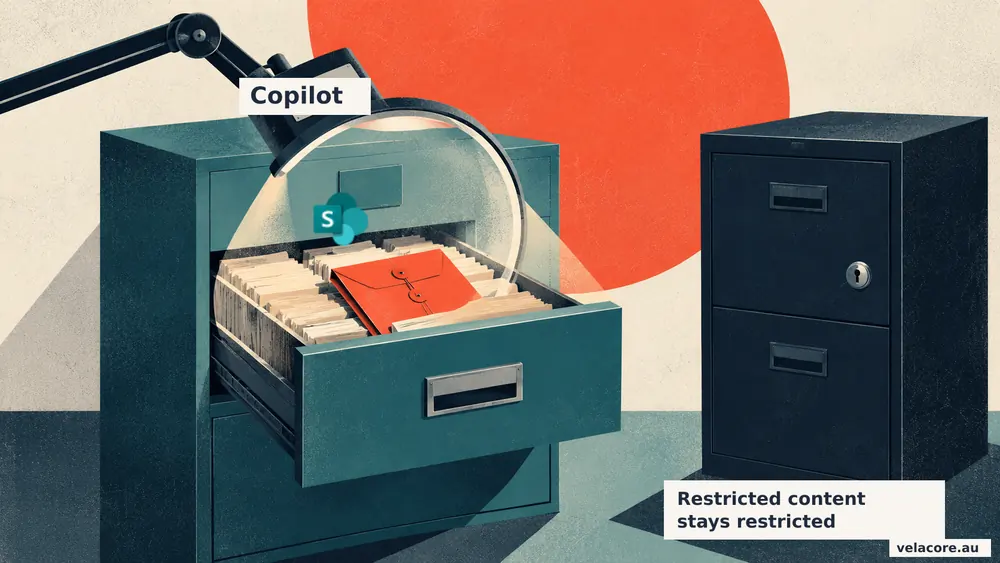
Review sensitive libraries, broad sharing links, group membership and ownership before widening AI discovery. Microsoft’s oversharing deployment guidance makes this a governance exercise, not a cosmetic intranet refresh.
Moving the same files into a custom AI search index does not solve the problem. The new retrieval path needs access enforcement too, including when permissions are revoked. An attractive search interface that returns documents before checking access has made the situation worse.
SharePoint vs custom development: which option fits the problem?
Choose the smallest change that resolves the business requirement. A tenant-wide rebuild should earn its scope; it should not be the default response to an unpopular menu.
| Route | Best fit | Main cost or responsibility |
|---|---|---|
| Repair SharePoint | Document discovery, site ownership, navigation and content governance | Information architecture, cleanup and continuing administration |
| Extend the Microsoft stack | Targeted forms, web parts and business apps close to Microsoft 365 | Supported development, licensing, release management and maintainers |
| Custom experience, retained documents | A distinctive portal or workflow that still needs Microsoft document collaboration | Integration, application authorisation and two clearly owned systems |
| Replace the affected application | A poor process or data-model fit that persists after simpler options are tested | Migration, product operations, recovery and ongoing engineering |
For an intranet interface, investigate supported modern SharePoint customisation first. For a relational business application, Power Apps with Microsoft Dataverse offers tables, relationships, security and business rules. Azure-hosted custom development is another valid option when Microsoft alignment matters.
AWS becomes a credible choice when the organisation needs a purpose-built product experience and has a clear reason for that hosting decision: existing engineering capability, integration requirements or an established cloud operating model. It is infrastructure for building the application, not a ready-made intranet substitute.
Velacore’s custom software development approach starts with those workflow and integration boundaries. The useful question is what the application must control, and what an existing platform should continue doing well.
Can a custom AWS application keep SharePoint documents?
Yes. A custom application can own the task experience while SharePoint continues storing the documents. Keeping those responsibilities separate can avoid rebuilding familiar editing and collaboration capabilities simply to improve one business process.
For example, a supplier portal could show onboarding progress, approval responsibilities and outstanding evidence in its own interface. Its backend would manage the process state and retrieve the permitted supporting documents through Microsoft Graph.
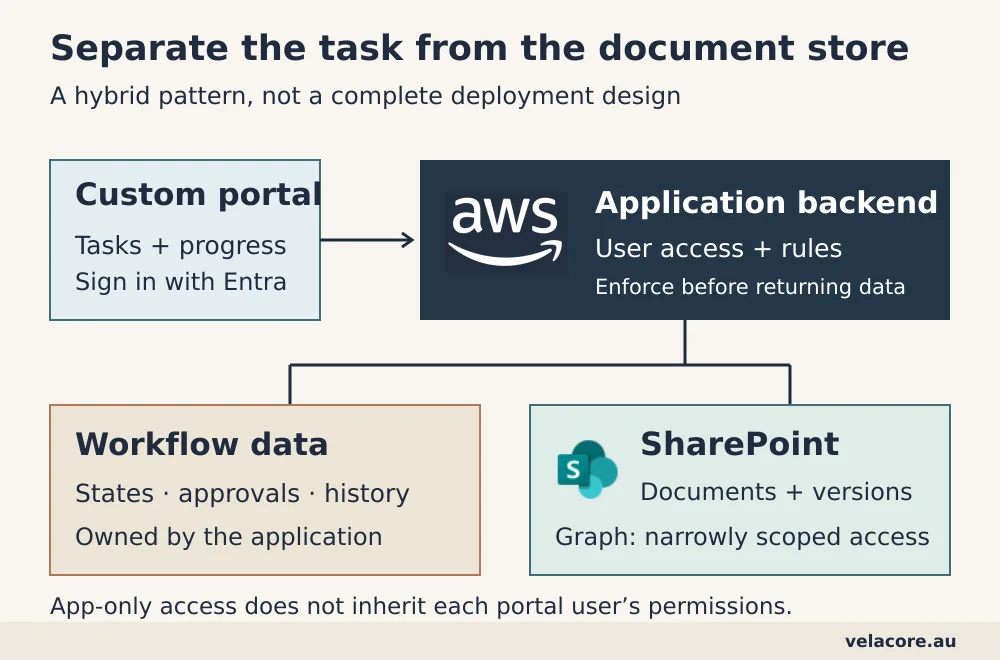
Microsoft’s Selected permissions model supports resource-scoped access. Consent alone does not grant access: the application also needs an explicit resource assignment and a valid token. Delegated access and application-only access are different; an application-only grant does not automatically restrict each portal user to their personal SharePoint permissions.
That distinction belongs in the design review. The backend must enforce the intended user access model. Downloading broadly accessible documents and hiding them in the browser is not access control.
Existing Microsoft identities can remain part of the experience. Amazon Cognito supports OpenID Connect identity providers, including Microsoft Entra ID. That establishes a sign-in route; Graph permissions and application authorisation still need their own design.
The hybrid route does introduce another dependency. If Graph is unavailable, the application needs a defined failure state rather than an endless spinner or a silent success. Document version history and workflow history should each have an owner, with a reliable link between them.
How do you calculate SharePoint total cost of ownership?
Compare incremental costs over the same period, including staff effort and ongoing operations. If the company will retain Microsoft 365 for email, Teams and Office, moving one workflow does not magically remove the entire licence bill.
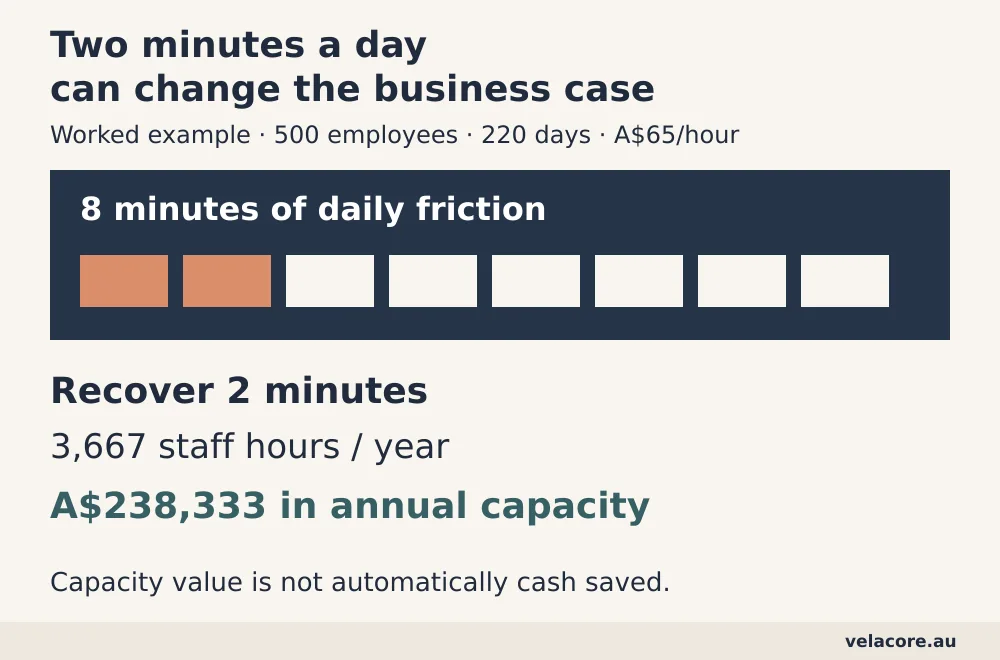
Use a narrow worked example. Suppose 500 employees each lose eight minutes per working day on a particular process, across 220 working days. At a loaded labour cost of A$65 an hour, that represents about A$953,333 a year in staff capacity. Those inputs are hypothetical; replace them with observed task timings and your finance team’s figures.
| Measured or assumed change | Annual time | Annual capacity value |
|---|---|---|
| Eight minutes of friction per person per day | 14,667 hours | A$953,333 |
| Two minutes recovered per person per day | 3,667 hours | A$238,333 |
| Only half of that improvement realised | 1,833 hours | A$119,167 |
A two-minute improvement is easier to test than a promise to “transform productivity”. Even then, capacity value is not automatically cash saved. State whether the benefit becomes more completed work, shorter queues, less overtime or reduced recruitment pressure.
Now compare that benefit with three-year costs: discovery, design, development, migration, integrations, security testing, licences, hosting, support, change requests and recovery exercises. Apply the same categories to the SharePoint repair option. Otherwise one proposal contains all the costs while the other quietly assumes free internal labour.
For a simple break-even check, a hypothetical A$300,000 incremental three-year cost needs A$100,000 of annual benefit before discounting. Under the assumptions above, that is roughly 0.84 minutes recovered per employee per working day. A business case that relies on every employee achieving the maximum saving should make you pause.
What should a SharePoint replacement pilot prove?
A useful pilot proves that one important task becomes easier and remains controlled. It should compare the current experience, a repaired SharePoint route and the proposed replacement against the same acceptance criteria.
Start with ten representative users and three recurring tasks. This is a practical discovery exercise, not a statistically representative study. Include occasional users and people who do not already know where everything lives.
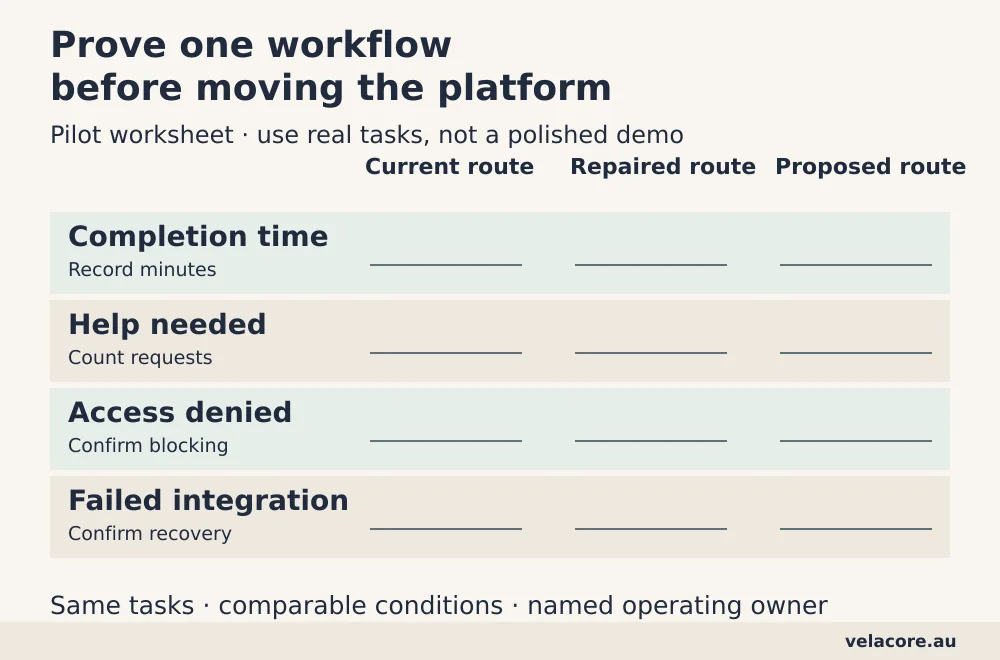
- Record the baseline. Measure completion time, failures, help requests and handoffs for each task.
- Test a cheaper repair. Improve the relevant navigation, content or form before assuming custom development is necessary.
- Test the proposed experience. Use the same task, comparable starting conditions and a different task order to reduce familiarity effects.
- Test controls and failure. Include denied access, duplicate submission, revoked permissions and an unavailable integration.
- Assign an operating owner. Demonstrate how a failed change is recovered and who responds when the process stops.
Ask users to explain what happened next. A fast form that leaves them unsure whether a request succeeded is not a finished improvement.
Before a wider migration, inventory the material that must survive: documents, versions, metadata, permissions, sharing links, embedded links, retention obligations and integrations. Decide which existing URLs remain, which need mapping and which external references cannot be redirected by the new application. A bulk file export is not a complete migration plan.
Which mistakes make a SharePoint alternative more expensive?
The most expensive mistake is rebuilding the visible interface while leaving the underlying process undefined. The result feels new but still needs the same manual chasing.
- Replacing everything at once. Separate a failing process from working document collaboration and migrate in bounded steps.
- Buying AI before fixing access. Test who can retrieve sensitive information, not just how well the assistant answers.
- Counting all Microsoft licensing as savings. Use the bill the organisation will actually stop paying.
- Ignoring legacy customisations. Inventory retired Add-ins separately from supported SPFx work before estimating replacement effort.
- Declaring launch the finish line. Budget for changing business rules, support, dependency updates and recovery testing.
The same separation of content and experience appears in our discussion of why AI does not replace a CMS: an improved interaction layer still needs governed information underneath it.
How do you make the final decision?
Shortlist SharePoint alternatives around a specific workflow, a measured cost and a realistic operating owner. That keeps a platform debate from turning into an expensive preference contest.
- Can clearer ownership, navigation or metadata solve the problem?
- Would a supported Microsoft extension meet the requirement?
- Which business rules genuinely need a dedicated application?
- Can documents stay in SharePoint while the experience changes?
- Does the measured benefit cover incremental lifetime costs?
- Can the team demonstrate access controls, failure recovery and a staged exit?
Keep the platform where it helps. Replace the workaround where it hurts. That is a stronger starting point than either “SharePoint is free” or “custom software will fix everything”.
For a workflow that has outgrown its current setup, discuss the process with Velacore. Bring the task, the handoffs and the exceptions; those tell us more than a list of disliked screens.
Frequently asked questions
What is the best alternative to SharePoint?
The best alternative depends on the job. An intranet needs publishing and navigation; a document platform needs collaboration and retention; a business application needs reliable rules, permissions and recovery. Consider repairing SharePoint, extending Microsoft 365, using Power Apps with Dataverse, or building a dedicated application. Compare the same requirements rather than choosing from a generic product ranking.
Is SharePoint being discontinued?
The 2026 retirement discussed here applies to SharePoint Online Add-ins, not SharePoint itself. Microsoft explicitly distinguishes that retirement from SharePoint Framework, REST APIs, CSOM and JSOM. Inventory the actual customisation model before deciding what must be replaced.
Can SharePoint handle more than 5,000 items?
Yes. Microsoft supports lists with up to 30 million items. The 5,000-item list view threshold affects certain operations, not total list capacity. Review indexing, filtering and query design before treating a blocked view as proof that the entire platform must be replaced.
Does Microsoft Copilot ignore SharePoint permissions?
No. Copilot honours access controls. The concern is information already shared too broadly: AI discovery can make it easier to find. Review existing permissions, group membership and sensitive content before expanding AI access, and test with accounts that should be denied.
Is a custom AWS application cheaper than SharePoint?
It can be, when a valuable workflow improvement outweighs development and operating costs. It can also be more expensive. Compare incremental licensing, internal labour, integrations, support, security and recovery over the same period. Include the Microsoft licences you will retain and distinguish recovered staff capacity from cash savings.
Do we have to move our documents out of Microsoft 365?
No. A hybrid application can retain SharePoint documents while managing tasks elsewhere. Microsoft Graph supports resource-scoped access, but the design must distinguish delegated from application-only permissions and enforce the intended access for each user. Keeping documents does not remove integration and governance work; it changes the migration boundary.