
Google Maps, genuine service areas and a clearer path to suitable enquiries.
A family searches for community access in their suburb. Your team can deliver it, but your profile is hard to find and your website never quite explains where you work. Local SEO for NDIS providers connects accurate Google Business Profile information with useful service and location pages, so participants and support coordinators can find and assess a suitable provider. Start with the business you actually operate, then make the next step clear.
That means getting three things right: where you deliver support, where you appear in local search, and what happens after someone contacts you. They are connected, but they are different jobs. A longer suburb list will not fix all three.
Your delivery area is an operational promise. Your map visibility is a search result. Your enquiries tell you whether the connection worked.
Where should local SEO for NDIS providers start?
Local visibility should reflect real support delivery, rather than a collection of suburbs chosen for traffic. Three facts help set the brief:
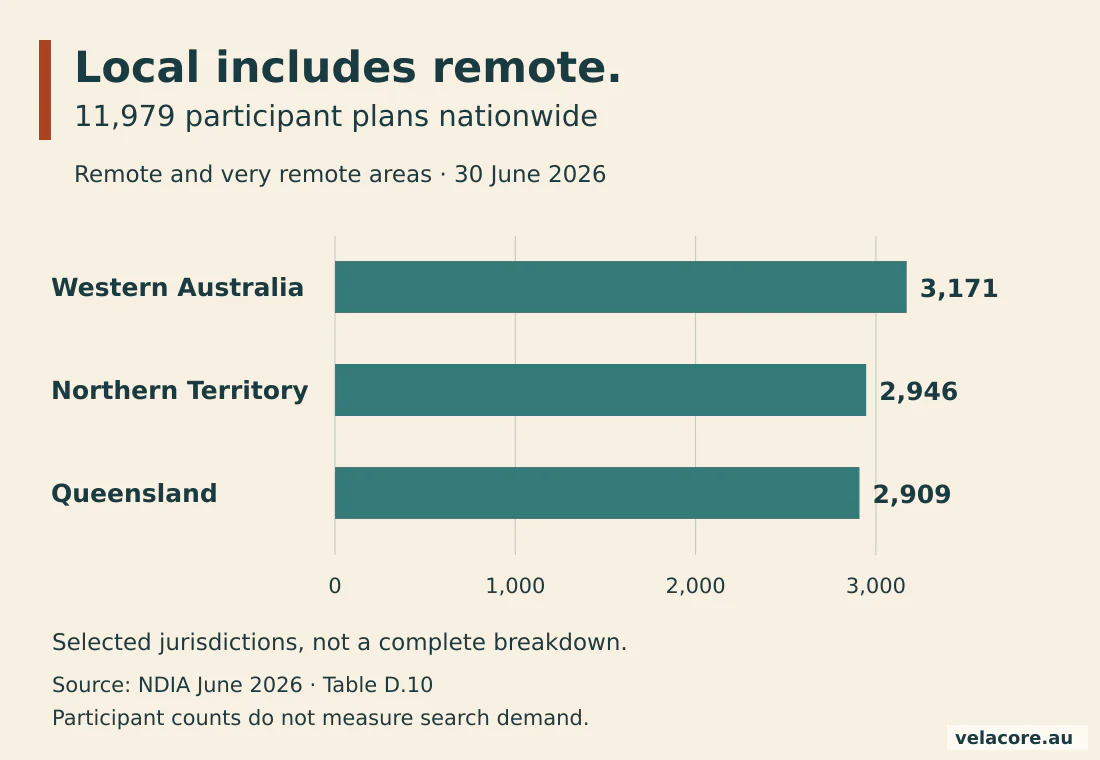
- Local does not always mean metropolitan. The NDIA recorded 11,979 active participant plans in remote and very remote areas at 30 June 2026. Delivery coverage deserves more thought than a capital-city keyword list. See NDIA Table D.10.
- A profile has a practical service-area limit. Google allows up to 20 named areas and says the overall area generally should be within about two hours’ drive of the base. That describes profile setup, not a guaranteed ranking radius. See Google’s service-area guidance.
- Communication information matters. In the ABS 2022 survey, 9.1% of people with disability aged 15 and over living in households primarily spoke a language other than English at home. That is a national disability population measure, not an NDIS audience forecast. See the ABS survey findings.
The first practical question is simple: Can someone tell whether you offer the support they need, in their area, in a way they can access? If not, fix that before chasing another keyword.
| Area | Plans |
|---|---|
| Western Australia | 3,171 |
| Northern Territory | 2,946 |
| Queensland | 2,909 |
| Australia, all jurisdictions | 11,979 |
1. Set up an NDIS Google Business Profile around your real business
An NDIS Google Business Profile should describe your actual location and delivery model. Work out whether people visit your premises, your workers travel to participants, or both happen. That decision comes before editing the address.
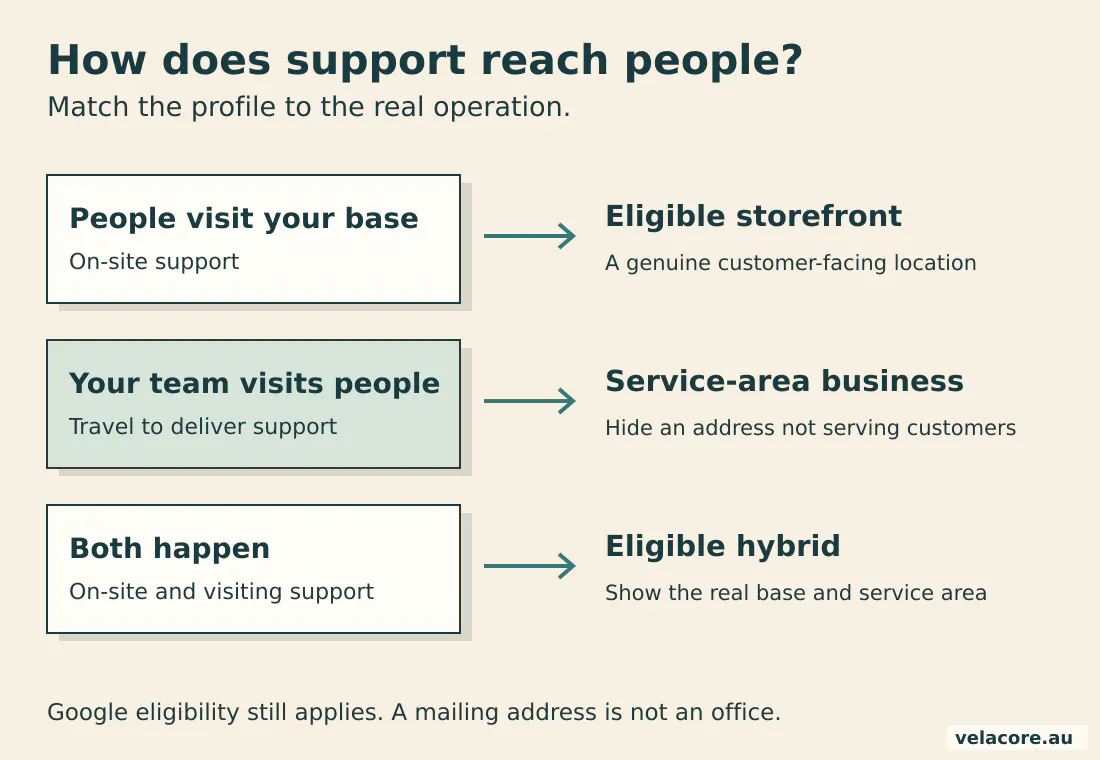
Google’s business eligibility rules require a genuine eligible operation. A virtual mailing address is not a shortcut to another local listing. Distinct offices can have profiles when they independently meet the applicable requirements; naming a suburb you serve does not create an office there.
For a visiting service that does not receive customers at its base, Google’s service-area instructions say to remove the displayed address. A hybrid business can show its address and service area when it genuinely serves people at the location and meets the storefront requirements.
Then check the details a person will use:
- Use your real business name, rather than adding a string of services and suburbs.
- Choose the most appropriate available category and only relevant additional categories.
- Check the phone number, website destination, hours and services.
- Use current photographs of genuine premises and team activity, with permission where people appear.
- Keep registration and funding statements accurate. The ACCC’s provider guidance explains why misleading NDIS claims are a problem.
A prospective participant should recognise the same organisation on Google, on the website and when the phone is answered. Consistency begins with those ordinary details.
2. Separate your service area from your local search visibility
Listing a service area tells people where you work; it does not guarantee that your profile will appear equally across that area. Google describes local results through relevance, distance and prominence in its local ranking guidance.
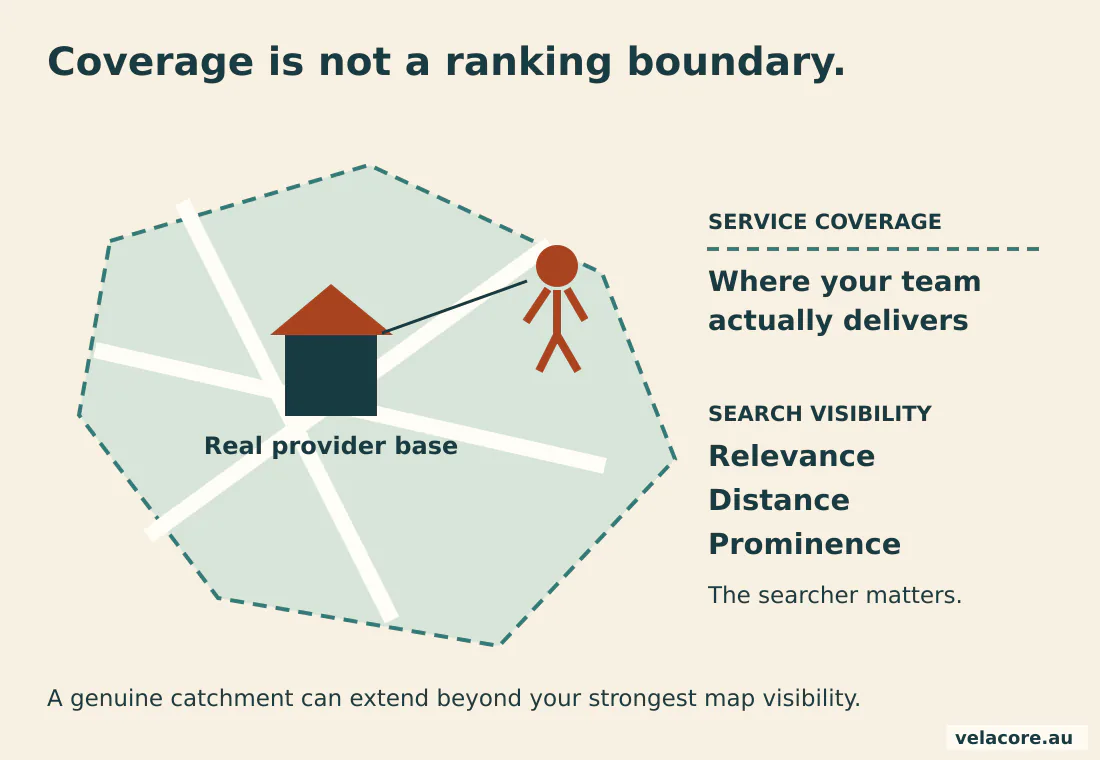
Imagine a provider based in Morley that also delivers community access in Joondalup. Joondalup may be a genuine catchment, yet a searcher there can still see closer or more relevant alternatives. Repeating Joondalup in the business name will not turn the delivery route into a second office.
Build a short catchment list with your service manager. Record the support offered, travel limits, current capacity and any practical access arrangements. Use that operational record to decide which locations deserve website coverage.
For NDIS local search checks, record the query, search location, date and device. Compare the same service and catchment over time. A single personalised search from the office is not a reliable verdict on what every family sees.
3. Build NDIS location pages that help someone choose
NDIS location pages earn their place when they explain meaningful differences in service delivery. A suburb name alone is not enough. The page should answer questions that the main service page cannot answer as clearly.
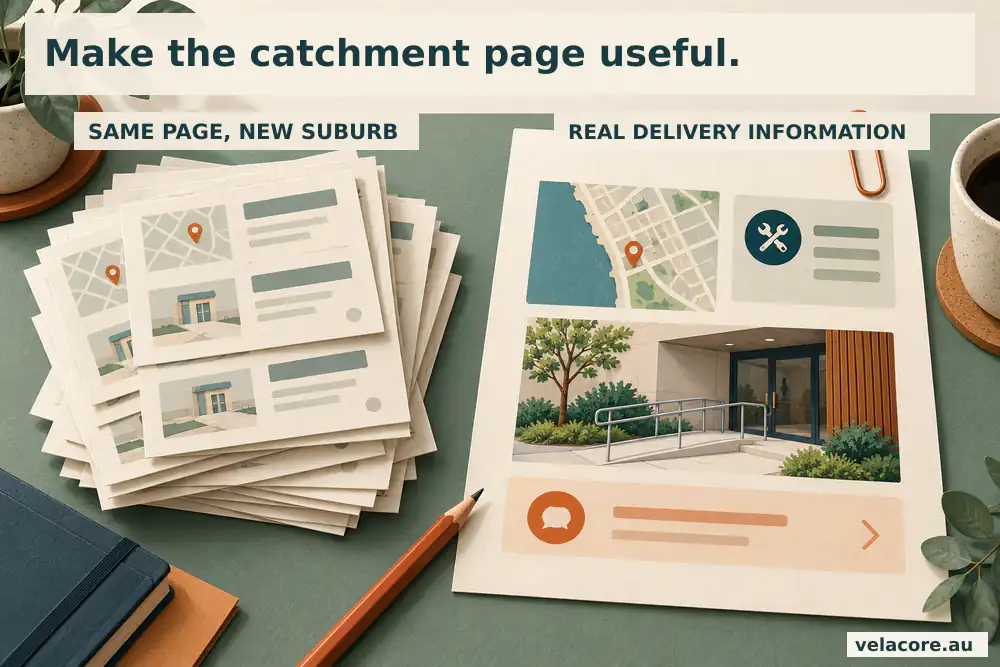
Start with the service, then the catchment. For example, a community access page for a real northern Perth catchment could explain which suburbs are covered, what activities the team supports, how transport is arranged and how someone checks availability. Those are useful distinctions. Replacing one suburb name across the same paragraph is not.
- State which supports are actually available in that catchment.
- Explain whether support happens at home, in the community or at a genuine venue.
- Describe relevant access, communication and transport arrangements accurately.
- Provide current capacity information or a clear way to ask about availability.
- Link to the detailed service page and a straightforward enquiry route.
Language support is worth describing when the team genuinely provides it. The national ABS figure above is a reason to ask better questions about your audience, not permission to promise languages you cannot support.
Where several nearby suburbs share the same delivery arrangements, one useful catchment page can serve them. Google’s doorway abuse policy is a good reason to avoid interchangeable location pages created chiefly to funnel visitors to the same destination.
If two pages differ only in their suburb name, combine them around the genuine catchment and redirect the retired address to the closest relevant page. Preserve useful local details and check existing traffic and links before choosing the destination.
The broader NDIS SEO strategy guide explains how service pages, catchments and capacity fit together. If the website itself makes enquiries difficult, the NDIS website design service addresses that part of the journey.
4. Build local trust without pressuring people for reviews
A review process should make honest feedback easy and protect the person’s privacy. Ask neutrally, offer a simple route and let the person decide whether to use it. Google’s review policy prohibits incentives, selectively soliciting positive reviews and pressure.
That rules out the familiar “Tell us privately if unhappy, post on Google if happy” funnel. It also rules out offering a reward for a rating. A neutral request can simply invite someone to share their experience, without asking for a particular score or details of their support.
Public replies need restraint. Thank the reviewer without confirming their participant status, diagnosis, support history or complaint details. Move an individual concern to the organisation’s established private process. A helpful public response should not become a public case note.
Check relevant directory and community listings too. A consistent name, public contact details and correct website link help people find the same organisation. Focus on genuine sector and local references, rather than collecting hundreds of unrelated directory entries.
Trust comes from the details matching. More listings are not a substitute for the right information.
5. Tag your profile link so local visits can be measured
A tagged Google Business Profile website link helps you distinguish profile visits from other organic visits in GA4. It does not identify every caller or explain every enquiry, but it gives the website part of the journey a useful source label.
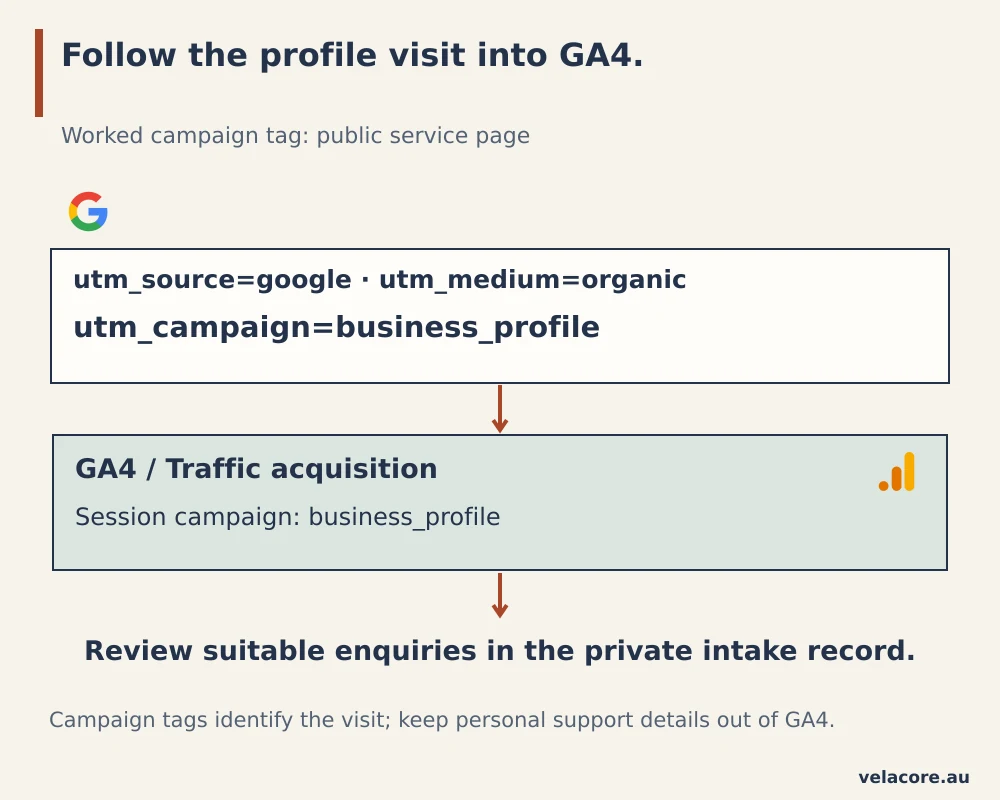
Google’s campaign URL documentation uses source, medium and campaign parameters. For a worked example, start with the relevant public service page:
https://provider.example/community-access/?utm_source=google&utm_medium=organic&utm_campaign=business_profileHere, provider.example is a demonstration domain. Replace it with your actual page. Keep the values consistent, copy the complete URL into the profile’s website field, and test that it reaches the intended page without losing the parameters.
- Open the tagged link and complete your normal consent choice.
- Check that the landing page explains the service and offers a working enquiry route.
- In GA4, open Reports → Acquisition → Traffic acquisition.
- Use Session campaign to find
business_profile, and check Session source / medium forgoogle / organic. - Compare those sessions with your configured enquiry events and the private intake team’s outcomes.
The Traffic acquisition reference describes these session dimensions. Report availability depends on the property’s configuration; an editor can restore a missing report. A working tagged URL is the first test, followed by a real test visit and a checked enquiry event.
Keep names, email addresses, NDIS numbers and sensitive support details out of URL parameters and analytics event values. Google’s personal information policy prohibits sending identifiable information to Analytics. Keep the detail needed to assess a referral in the appropriate private intake system.
6. Count conversations, not just call-button clicks
Google Business Profile’s Calls metric counts clicks on the call button, not completed conversations. Website clicks are also an interaction, not an enquiry. Google’s performance metric definitions make that distinction explicit.
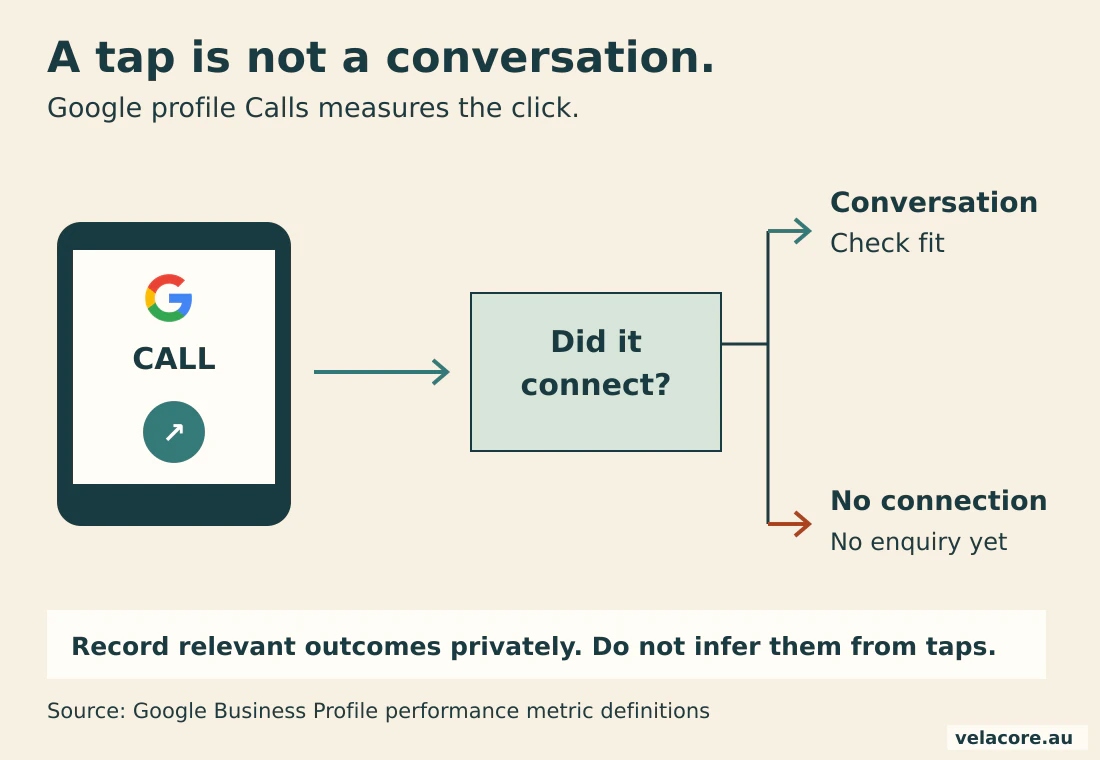
This is where a local report can look healthier than the service pipeline. Someone can tap, abandon the call, ask about a job or need a service you do not provide. The click happened, but it did not necessarily help a participant find suitable support.
| Measure | What it tells you | What to check next |
|---|---|---|
| Profile search terms and views | How the profile was discovered and seen | Are searches aligned with the supports and catchments you serve? |
| Profile Calls | Clicks on the call button | Did a conversation connect, and was the enquiry relevant? |
| Profile website clicks | Clicks from the profile to its website link | Do tagged visits reach the right service page? |
| GA4 campaign sessions and enquiry events | Measured website activity associated with the tagged link | Are event definitions correct, with duplicate or spam activity excluded? |
| Private suitable-enquiry record | Whether the person needed an offered service in a covered area | What happened next, including availability and response? |
Profile performance can include activity from organic results and Google Ads, so do not relabel the whole report as organic acquisition. Set out the sources and definitions before comparing it with GA4.
A call-button tap is a signal of interest. A suitable conversation is the outcome your team needs to understand. Track both without pretending they are the same number.
7. Give the monthly review a decision to make
A monthly local SEO review should end with a concrete action: correct a profile detail, improve a page, resolve an enquiry problem or keep a useful approach running. Check the service and catchment together, rather than reporting one site-wide ranking number.
Use this compact routine:
- Review profile details against actual operations and capacity.
- Check service-and-location queries and landing pages in Search Console.
- Compare profile interactions, tagged sessions and suitable enquiries using the same date range.
- Read recurring intake questions and update the page that should answer them.
- Assign the next change to a named owner and check it after publication.
In Velacore’s Perth NDIS case study, the work connected service architecture, genuine catchments, profile improvements and enquiry measurement. That connected approach is the useful lesson; the individual result is not a forecast for another provider.
For the wider reporting structure, see how SEO campaigns are reported. If you need the services coordinated, explore Velacore’s SEO services.
Which mistakes make local SEO harder than it needs to be?
The most expensive local SEO mistakes usually begin with a mismatch between the marketing and the operation. A profile promises one thing, a page says another, and the intake team has to untangle it.
- Creating a profile for every suburb. Delivery coverage is not a collection of eligible offices.
- Publishing interchangeable location pages. Add a useful difference or combine the coverage.
- Leaving capacity and contact details stale. Give one person responsibility for checking them.
- Requesting only positive reviews. Use a neutral, voluntary feedback process.
- Reporting clicks as participants acquired. Keep interaction and suitable-enquiry measures distinct.
- Using analytics as an intake record. Keep personal and sensitive information in the private system designed for it.
Before the next publishing push, check one profile, one important service page and one complete enquiry journey. A small test can expose a bigger disconnect.
Frequently asked questions
Can an NDIS provider appear on Google Maps without a public office?
A provider that travels to customers may qualify as a service-area business. If customers are not served at its base, the address should be hidden. The underlying operation must still meet Google’s eligibility requirements; a virtual mailing address does not establish an eligible office.
Do we need a separate NDIS page for every suburb?
No. Create separate pages where genuine delivery differences help someone decide. Where nearby suburbs share the same services and arrangements, a useful catchment page can cover them together. Link it to the relevant support pages and explain the real area served.
Does adding more Google service areas improve our rankings?
Adding areas communicates coverage; it does not guarantee visibility across them. Google’s local ranking system considers relevance, distance and prominence. Focus on accurate information and useful pages for genuine catchments rather than filling every available service-area slot.
How should we ask participants or families for reviews?
Invite honest feedback neutrally and voluntarily, without rewards, pressure or filtering for likely positive reviewers. Do not request sensitive support details. Public replies should avoid revealing personal information or confirming someone’s support history.
How do we know if Google Maps brings suitable enquiries?
Use a consistently tagged profile website link, check its campaign sessions and enquiry events in GA4, and compare them with private intake outcomes. Profile Calls counts button clicks, so confirm actual conversations separately. Keep the definitions clear and do not send personal intake details to Analytics.
How long should we give local SEO before judging it?
Separate correction from growth. Fix inaccurate contact or service information immediately, then review search visibility and suitable enquiries over consistent periods. There is no universal ranking deadline. The starting website, local competition, profile eligibility and implementation all affect what changes first.
Make local visibility lead somewhere useful
Local SEO for NDIS providers works best when the profile, website and intake process tell the same story. Show the supports you offer, the catchments you genuinely serve and the next step someone can take. Then measure whether that journey produces relevant conversations.
Get a free NDIS SEO gap audit to identify where local discovery or the enquiry journey needs attention.